

Need 100 Laptops for Remote Employees? Here’s the Fastest Rental Solution

Introduction
As remote and hybrid work continue to shape modern businesses, companies are increasingly faced with the challenge of deploying laptops to employees quickly and efficiently. Whether you’re onboarding a new team, expanding operations, opening a new project, or supporting work-from-home employees across multiple cities, purchasing 100 laptops can require significant capital investment, long procurement cycles, and complex IT management.
This is where corporate laptop rental becomes a smarter and more flexible solution. Instead of waiting weeks or months for procurement, businesses can rent fully configured laptops and have them delivered directly to employees across India in a matter of days.
Rental Plaza specializes in enterprise laptop rental, bulk laptop rental, and work-from-home IT deployment for startups, SMEs, large enterprises, BPOs, IT companies, consulting firms, educational institutions, and multinational organizations. With flexible rental plans, PAN India delivery, and dedicated technical support, companies can deploy hundreds of laptops without blocking valuable capital.
Why Companies Need 100 Laptops Quickly
Business requirements can change overnight. A successful funding round, a new client project, seasonal hiring, or an acquisition can create an immediate need for additional devices.
Common situations include:
- Hiring 100 remote employees
- Launching a new development center
- Opening a branch office
- Work-from-home implementation
- Temporary project staffing
- Corporate training programs
- BPO and customer support expansion
- Campus hiring and graduate onboarding
- Disaster recovery and business continuity planning
Buying new laptops for every situation is often expensive and time-consuming. Rental solutions provide businesses with the flexibility to scale up or down based on project requirements.
Challenges of Buying 100 Laptops
Purchasing laptops in bulk may seem straightforward, but many organizations face several obstacles.
High Upfront Investment
Buying 100 business laptops requires a substantial capital expenditure that can impact cash flow and delay investments in other strategic initiatives.
Long Procurement Time
Ordering large quantities often involves vendor negotiations, approvals, inventory shortages, and shipping delays, extending deployment timelines.
IT Configuration
Each laptop must be prepared with:
- Windows or macOS
- Company applications
- Security software
- VPN access
- Productivity tools
- User accounts
- Device policies
This process can consume significant IT resources.
Asset Management
Purchased devices require ongoing tracking, maintenance, upgrades, repairs, and eventual replacement.
Why Renting Is the Faster Solution
Corporate laptop rental eliminates many of these challenges.
Businesses receive ready-to-use laptops without making a large upfront investment. Devices can be configured according to company requirements and shipped directly to employees or office locations.
Benefits include:
- Fast deployment
- Flexible rental duration
- No large capital expense
- Latest business-grade laptops
- Easy scalability
- Technical support
- Device replacement in case of hardware issues
- Simplified IT asset management
How Rental Plaza Simplifies Bulk Laptop Deployment
Rental Plaza helps companies deploy laptops quickly and efficiently through a streamlined process.
Consultation
The process begins by understanding your workforce size, software requirements, preferred laptop specifications, rental duration, and delivery locations.
Device Selection
Businesses can choose from a wide range of enterprise laptops, including Intel Core i5, Intel Core i7, Intel Core Ultra, AMD Ryzen systems, high-performance workstations, and MacBooks.
Pre-Configuration
Before dispatch, devices can be prepared with:
- Windows 11 Pro
- Microsoft Office
- VPN software
- Endpoint security
- Antivirus
- Collaboration tools
- Company-specific applications
- Required drivers and updates
Employees receive laptops that are ready to use from day one.
PAN India Delivery
Whether your employees are located in Delhi, Mumbai, Bengaluru, Hyderabad, Pune, Chennai, Ahmedabad, Kolkata, Chandigarh, Noida, Gurgaon, or smaller cities, devices can be delivered directly to their locations.
Ideal Industries for Bulk Laptop Rental
Bulk laptop rental is suitable for a wide range of industries, including:
- IT and Software Development
- Business Process Outsourcing (BPO)
- Knowledge Process Outsourcing (KPO)
- Financial Services
- Consulting Firms
- Healthcare Organizations
- Educational Institutions
- E-commerce Companies
- Digital Marketing Agencies
- Government Projects
- Engineering Companies
- Startups and Unicorns
- Multinational Corporations
- Shared Service Centers
Key Benefits for Remote Workforce Deployment
Organizations managing remote teams benefit from:
- Standardized device configurations
- Reduced procurement delays
- Lower IT workload
- Easy onboarding of new employees
- Consistent security policies
- Faster employee productivity
- Simplified equipment replacement
- Flexible scaling as teams grow
These advantages allow businesses to focus on operations rather than hardware logistics.
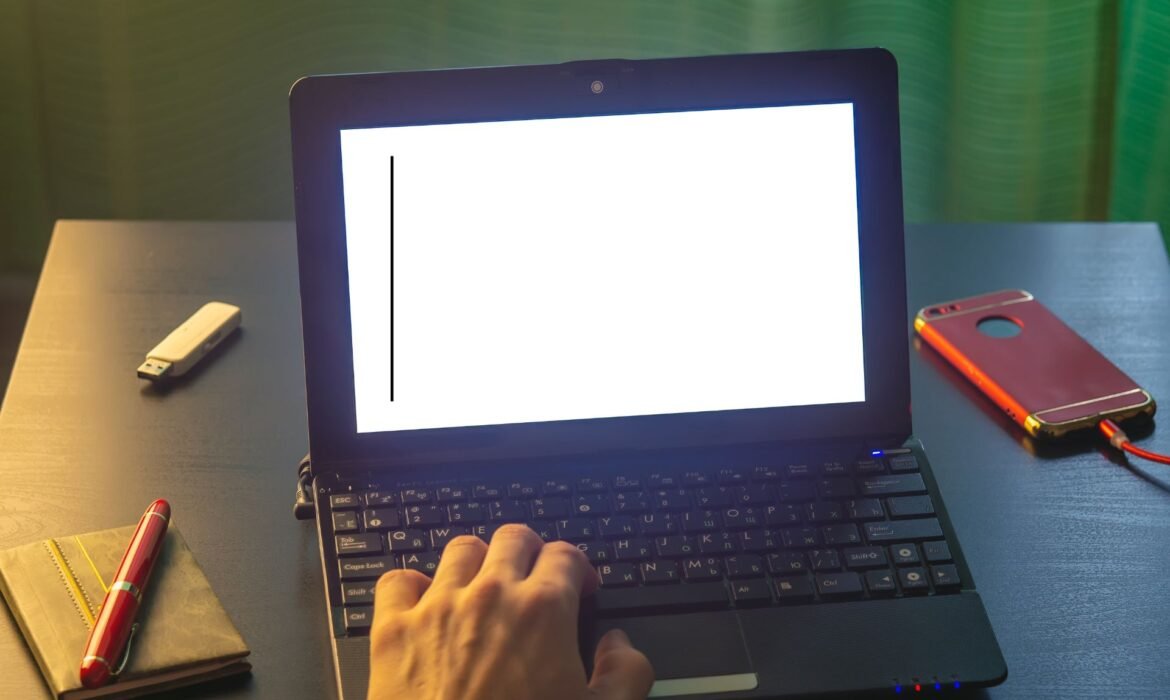
Horizontal Lines on Laptop Screen: Causes and Solutions
Seeing horizontal lines on your laptop screen can be alarming, especially if they appear suddenly while working, attending online meetings, gaming, or editing important files. The lines may be thin or thick, colored or black, and they may flicker or remain permanently visible. In some cases, they appear only when the laptop lid is moved, while in others they stay on the screen all the time.
The good news is that horizontal lines do not always mean the screen is permanently damaged. The problem can be caused by loose display cables, graphics driver issues, overheating, GPU problems, or an actual LCD panel failure. Identifying the exact cause is the most important step before deciding whether the laptop needs repair or screen replacement.
In this detailed guide, we’ll explain the common causes of horizontal lines on laptop screens, how to diagnose the problem, step-by-step troubleshooting methods, repair options, and practical prevention tips to avoid future display issues.
What Do Horizontal Lines Look Like?
Horizontal lines can appear in several forms:
- Thin black lines across the screen
- White horizontal lines
- Colored lines (red, green, blue, or pink)
- Flickering horizontal bands
- Multiple parallel lines
- A single line at the top, middle, or bottom of the display
The appearance of the lines can provide important clues about the underlying problem. For example, a single stable line may indicate panel damage, while flickering colored lines often point to a cable or GPU issue.
Common Causes of Horizontal Lines on a Laptop Screen
Loose or Damaged Display Cable (LVDS/eDP Cable)
The display cable connects the motherboard to the laptop screen. Every time you open and close the lid, the cable bends slightly near the hinge area. Over time, it can become loose, worn, or damaged.
Symptoms:
- Lines appear when the lid is moved
- The display flickers intermittently
- The image may disappear at certain angles
- Pressing near the hinge may change the display
This is one of the most common and most repairable causes of horizontal lines.
Graphics Driver Issues
Corrupted or outdated graphics drivers can cause display artifacts, including horizontal lines. This is more common after Windows updates, driver installations, or software conflicts.
Symptoms:
- Lines appear only after Windows starts
- The BIOS screen looks normal
- The issue may disappear after restarting
- External monitor may show the same problem
Updating or reinstalling the graphics driver often resolves this issue.
LCD Panel Damage
Physical damage to the LCD panel can create permanent horizontal lines. The panel may be damaged by:
- Dropping the laptop
- Closing the lid on an object
- Excessive pressure on the screen
- Twisting the laptop chassis
Symptoms:
- Lines remain visible all the time
- The lines do not change when the lid moves
- There may be cracks, pressure marks, or dark patches
- The affected area may show distorted colors
A damaged LCD panel usually requires screen replacement.
GPU (Graphics Processing Unit) Problems
A failing graphics chip can cause horizontal lines, flickering, artifacts, and system crashes. This is more common in older laptops and gaming laptops that have experienced prolonged overheating.
Symptoms:
- Lines appear on both the laptop screen and an external monitor
- The laptop may freeze or restart randomly
- Artifacts appear during gaming or heavy graphics workloads
- The issue becomes worse as the laptop heats up
GPU-related problems are usually more serious and may require motherboard repair or replacement.
Overheating
Excessive heat can affect both the GPU and the display circuitry. Dust buildup, blocked vents, or failing cooling fans can cause the laptop to overheat.
Symptoms:
- Lines appear after long periods of use
- The laptop feels unusually hot
- Fan noise is excessive
- Performance drops due to thermal throttling
Cleaning the cooling system can often prevent further damage.
Refresh Rate or Resolution Settings
Incorrect display settings can sometimes create flickering horizontal lines, especially after connecting external monitors or changing graphics settings.
Symptoms:
- Lines appear only at certain resolutions
- Changing the refresh rate affects the issue
- The problem started after connecting a monitor or TV
Adjusting the display settings may solve the problem.
How to Diagnose the Problem
Step 1: Check the BIOS Screen
Restart the laptop and enter the BIOS or UEFI settings.
- Lines visible in BIOS: hardware problem (screen, cable, or GPU)
- No lines in BIOS: likely a driver or software issue
This is one of the easiest ways to narrow down the cause.
Step 2: Move the Laptop Lid
Slowly open and close the lid while watching the screen.
- Lines change or disappear: display cable issue
- Lines remain unchanged: panel or GPU problem
If the display flickers when the lid moves, the cable is the most likely culprit.
Step 3: Connect an External Monitor
Connect the laptop to an external monitor or TV using HDMI or USB-C.
- External display is normal: laptop screen or cable problem
- External display also has lines: GPU or motherboard issue
This test helps separate display problems from graphics problems.
Step 4: Take a Screenshot
Take a screenshot and view it on another device.
- Lines visible in screenshot: graphics or software issue
- Lines not visible in screenshot: physical display problem
Physical screen defects usually do not appear in screenshots.
Step-by-Step Solutions
Restart the Laptop
A temporary graphics glitch may disappear after a restart. This should always be the first step.
Update or Reinstall Graphics Drivers
Windows:
- Press Win + X
- Open Device Manager
- Expand Display adapters
- Right-click your graphics card
- Select Update driver
- Restart the laptop
If the problem started after a recent driver update, try Roll Back Driver from the same menu.
Change the Refresh Rate
Windows 11:
- Open Settings
- Go to System > Display > Advanced display
- Select a different refresh rate (60 Hz is the safest option)
Incorrect refresh rates can cause flickering or unstable horizontal lines.
Boot into Safe Mode
Safe Mode loads basic display drivers.
- Lines disappear in Safe Mode: driver or software issue
- Lines remain in Safe Mode: hardware problem
This is a useful test before opening the laptop or replacing parts.
Reseat the Display Cable (Advanced)
If you are comfortable opening the laptop:
- Power off the laptop
- Disconnect the charger
- Remove the back cover
- Locate the display cable connector
- Disconnect and reconnect it carefully
- Reassemble the laptop and test the display
If you are unsure, have a technician perform this step.
Clean the Cooling System
Overheating can worsen display issues.
Use compressed air to clean the vents and fans, and ensure the laptop is used on a hard surface with proper airflow. If temperatures remain high, thermal paste replacement may be necessary.
When the Screen Needs Replacement
Replace the LCD panel if:
- The lines are permanent
- The screen has visible cracks
- Pressure marks are present
- Colors are distorted
- Parts of the display are blank
- The lines remain even after cable replacement
A damaged panel cannot usually be repaired at the component level.
Estimated Repair Cost in India
Approximate repair costs:
| Problem | Estimated Cost |
|---|---|
| Display cable replacement | ₹1,000 – ₹2,500 |
| Graphics driver/software fix | ₹500 – ₹1,500 |
| LCD screen replacement (HD) | ₹2,500 – ₹4,500 |
| LCD screen replacement (Full HD) | ₹4,000 – ₹7,500 |
| IPS panel replacement | ₹5,500 – ₹9,000 |
| GPU repair / motherboard repair | ₹4,000 – ₹15,000+ |
Costs vary depending on the laptop model and availability of parts.
Brand-Specific Notes
Lenovo Laptops
ThinkPad and IdeaPad models commonly develop display cable issues near the hinge after years of opening and closing the lid.
HP Laptops
HP Pavilion and Victus series may show horizontal lines due to cable wear or panel damage after accidental pressure on the lid.
Dell Laptops
Dell Latitude and Inspiron models can experience eDP cable issues, especially if the hinge becomes stiff over time.
ASUS and Acer Laptops
Gaming models may develop GPU-related artifacts if cooling is inadequate or dust buildup becomes severe.
Prevention Tips
Open and Close the Lid Gently
Avoid jerking the lid open or closed, as this stresses the display cable and hinges.
Use a Padded Laptop Bag
A padded sleeve or backpack protects the screen from pressure and impact during travel.
Keep the Laptop Cool
Clean the vents regularly and avoid blocking airflow. Use a cooling pad if the laptop runs hot during heavy workloads.
Avoid Placing Objects on the Keyboard
Even small objects can press against the screen when the lid is closed and cause panel damage.
Update Drivers Regularly
Install graphics driver updates from the laptop manufacturer’s website rather than relying solely on generic Windows drivers.
When Should You Seek Professional Repair?
Contact a technician if:
- The lines are getting worse
- The display flickers constantly
- The external monitor also shows artifacts
- The laptop overheats frequently
- You suspect GPU failure
- The screen has physical damage
- The display cable replacement did not solve the issue
Early diagnosis can prevent further damage and reduce repair costs.
Temporary Solution if You Need the Laptop Urgently
If the laptop is still functional, connect it to an external monitor and continue working while arranging for repair. This is often the quickest way to avoid downtime.
For businesses and professionals who cannot afford interruption, using a temporary replacement laptop can help maintain productivity until the original device is repaired.
Conclusion
Horizontal lines on a laptop screen can be caused by a loose display cable, graphics driver problems, overheating, GPU failure, or a damaged LCD panel. The key to fixing the issue is identifying whether it is a software problem or a hardware defect.
Start by checking the BIOS, moving the lid, connecting an external monitor, and testing in Safe Mode. Many cable and driver issues can be repaired without replacing the screen, while permanent lines caused by panel damage usually require LCD replacement.
By handling your laptop carefully, keeping it cool, updating drivers regularly, and avoiding pressure on the display, you can significantly reduce the risk of developing horizontal lines in the future. If the lines are spreading, flickering constantly, or appearing on both the laptop screen and an external monitor, seek professional repair as soon as possible to prevent further hardware damage.

How Much Does Enterprise Laptop Rental Cost?

Introduction
As businesses continue to expand, adopt hybrid work models, and accelerate digital transformation, the demand for enterprise laptop rental has grown rapidly. Organizations no longer view laptops as a one-time purchase—they see them as essential business tools that should be flexible, scalable, and cost-effective.
Whether you are a startup hiring your first employees, a multinational corporation opening new offices, a Global Capability Center (GCC) onboarding hundreds of professionals, or an overseas company expanding into India, one of the most common questions is:
“How much does enterprise laptop rental cost?”
The answer depends on several factors, including laptop specifications, rental duration, quantity, software requirements, and support services. Enterprise laptop rental is not a one-size-fits-all solution. Every organization has unique business needs, and rental plans are designed accordingly.
Instead of making a significant capital investment in purchasing laptops, many companies now prefer renting enterprise devices because it provides financial flexibility, faster deployment, and easier IT management.
In this guide, we’ll explain the factors that influence enterprise laptop rental pricing, what businesses should consider before renting, and why Rental Plaza is a trusted partner for enterprise IT rental across India.
What Is Enterprise Laptop Rental?
Enterprise laptop rental is a business service that allows organizations to lease laptops for a specific period instead of purchasing them.
Companies can rent laptops for:
- Employee onboarding
- Office expansion
- Corporate training
- Software development
- Temporary projects
- Business events
- Hybrid workforce
- Work From Home teams
- Global Capability Centers (GCCs)
- Overseas business expansion
Rental plans are available for both short-term and long-term business requirements.
Why Companies Prefer Laptop Rental
Before discussing pricing, it’s important to understand why businesses are choosing rental instead of ownership.
Enterprise laptop rental provides:
- Lower upfront investment
- Faster deployment
- Flexible monthly payments
- Easy hardware upgrades
- Technical support
- Simplified asset management
- Predictable IT budgeting
- Faster employee onboarding
These advantages often outweigh the long-term costs of ownership.
Factors That Affect Enterprise Laptop Rental Cost
There is no fixed price for enterprise laptop rental because several variables determine the final rental cost.
1. Laptop Configuration
The hardware specifications significantly influence rental pricing.
Entry-level business laptops typically cost less than high-performance engineering or AI laptops.
Common configuration factors include:
- Processor generation
- RAM capacity
- SSD storage
- Graphics card
- Display size
- Operating system
- Battery performance
Higher specifications generally result in higher rental charges.
2. Rental Duration
The length of the rental agreement affects the monthly cost.
Typical rental periods include:
- Daily rental
- Weekly rental
- Monthly rental
- Quarterly rental
- Annual rental
- Multi-year enterprise contracts
Longer rental commitments often provide better value and more predictable budgeting.
3. Quantity of Laptops
Bulk orders usually offer better pricing than renting individual devices.
Organizations commonly rent:
- 20 laptops
- 50 laptops
- 100 laptops
- 250 laptops
- 500 laptops
- 1,000+ laptops
Larger deployments also simplify procurement and standardization.
4. Software Requirements
Many businesses require laptops with pre-installed software.
Examples include:
- Microsoft Office
- Windows 11 Pro
- Antivirus solutions
- VPN clients
- Development tools
- Design software
- Enterprise applications
Software licensing and configuration requirements may influence the overall rental package.
5. Technical Support
Support services are another factor in enterprise rental pricing.
Businesses often require:
- Help desk assistance
- Hardware troubleshooting
- Replacement devices
- Preventive maintenance
- Remote support
- On-site assistance (where applicable)
A comprehensive support package can reduce downtime and improve productivity.
6. Delivery Locations
Companies with employees in multiple cities may require nationwide deployment.
Rental Plaza offers PAN India delivery, enabling businesses to equip teams across locations without managing separate logistics providers.
Why Enterprise Laptop Rental Is Cost-Effective
While purchasing laptops may seem like a long-term investment, ownership comes with several hidden expenses.
These include:
- Procurement
- Shipping
- Warranty management
- Repairs
- Hardware failures
- Device replacements
- Storage
- Asset tracking
- Technology upgrades
- Disposal of outdated equipment
Rental combines many of these responsibilities into a single managed solution, reducing administrative overhead.
Convert CAPEX into OPEX
One of the biggest financial advantages of enterprise laptop rental is converting Capital Expenditure (CAPEX) into Operational Expenditure (OPEX).
Instead of making a large one-time purchase, organizations spread technology costs over the rental period.
This improves:
- Cash flow
- Budget planning
- Financial flexibility
- Working capital
- Investment opportunities
Many CFOs and finance teams prefer this model because it supports business growth without tying up capital.
Ideal Industries for Enterprise Laptop Rental
Enterprise laptop rental supports organizations across many sectors.
Information Technology
Software development teams require standardized, high-performance laptops.
BPO and Customer Support
Large employee onboarding becomes easier with bulk laptop deployment.
Consulting Firms
Project-based staffing benefits from flexible rental agreements.
Financial Services
Secure laptops help maintain compliance and productivity.
Healthcare
Hospitals and healthcare providers rely on dependable business devices.
Education
Universities and training institutes use rental laptops for labs, workshops, and examinations.
Laptop Options for Every Business
Rental Plaza offers laptops suitable for different departments.
Business Laptops
Best for:
- HR
- Administration
- Finance
- Sales
- Customer Support
Developer Laptops
Suitable for:
- Software Engineers
- DevOps Teams
- Cloud Professionals
- Full Stack Developers
High-Performance Laptops
Designed for:
- AI Engineers
- Data Scientists
- Machine Learning Teams
- Simulation Workloads
MacBook Rental
Ideal for:
- Creative Agencies
- UI/UX Designers
- Marketing Teams
- Video Editors
Organizations receive hardware aligned with business requirements rather than paying for unnecessary specifications.
Enterprise Features Included
Rental Plaza focuses on delivering business-ready devices.
Each laptop undergoes a 20-point quality inspection before delivery to ensure dependable performance.
Enterprise deployments can include:
- Windows installation
- Microsoft Office setup
- Security configuration
- Antivirus installation
- Asset tagging
- Business software installation
Devices arrive ready for immediate use.
PAN India Deployment
Modern enterprises hire employees across multiple locations.
Rental Plaza provides nationwide delivery to major cities, including:
- Bengaluru
- Hyderabad
- Mumbai
- Pune
- Chennai
- Delhi NCR
- Gurugram
- Noida
- Ahmedabad
- Chandigarh
- Jaipur
- Kolkata
- Kochi
- Lucknow
- Indore
- Surat
- Nagpur
Devices can be delivered directly to corporate offices or remote employees.
Flexible Rental Plans
Every business has unique requirements.
Rental Plaza offers:
- Short-term rentals
- Long-term rentals
- Monthly plans
- Quarterly plans
- Annual agreements
- Enterprise contracts
Organizations can scale device quantities up or down as hiring needs change.
Technical Support and Maintenance
Reliable support is essential for business continuity.
Rental Plaza provides:
- Technical assistance
- Hardware troubleshooting
- Replacement devices
- Preventive maintenance
- Fast issue resolution
This allows internal IT teams to focus on strategic initiatives rather than hardware maintenance.
Simplified IT Asset Management
Managing hundreds of laptops across different offices can be challenging.
Rental Plaza helps businesses with:
- Device allocation
- Asset tracking
- Employee assignment
- Upgrade planning
- Replacement management
- End-of-rental collection
This simplifies IT operations while reducing administrative effort.
What Should Companies Consider Before Renting?
Before choosing an enterprise laptop rental partner, businesses should evaluate:
- Required laptop specifications
- Number of employees
- Rental duration
- Delivery locations
- Security requirements
- Technical support expectations
- Future expansion plans
- Scalability of the provider
- Device quality standards
- Service response times
Selecting the right partner ensures smoother deployments and better long-term value.
Why Businesses Choose Rental Plaza
Rental Plaza has become a trusted enterprise IT rental partner for organizations across India.
Key advantages include:
- Enterprise laptop rental expertise
- Bulk laptop deployment
- Large inventory availability
- PAN India delivery
- Flexible monthly rental plans
- Customized laptop configurations
- 20-point quality-tested devices
- Dedicated technical support
- Fast replacement services
- Multi-city deployment capabilities
Whether your organization needs 25 laptops or more than 2,000 devices, Rental Plaza delivers scalable solutions tailored to your business.
The Future of Enterprise Laptop Rental
Businesses are increasingly adopting flexible technology models.
Growing trends include:
- Device as a Service (DaaS)
- Hardware as a Service (HaaS)
- Managed IT Services
- Subscription-based technology
- Cloud-managed devices
- Sustainable IT procurement
These models help organizations stay agile while reducing infrastructure costs.
Conclusion
The cost of enterprise laptop rental depends on factors such as hardware configuration, rental duration, quantity, software requirements, delivery locations, and support services. Instead of focusing only on the monthly rental amount, businesses should evaluate the overall value they receive—rapid deployment, financial flexibility, reduced IT management, and reliable technical support.
Rental Plaza provides enterprise laptop rental solutions designed for startups, SMEs, multinational corporations, Global Capability Centers, BPOs, consulting firms, educational institutions, and overseas companies expanding into India. With enterprise-grade laptops, flexible monthly rental plans, PAN India delivery, customized configurations, and dedicated support, Rental Plaza helps organizations deploy technology efficiently without the burden of ownership.
If your business is planning to hire new employees, launch a new office, support a hybrid workforce, or expand operations across India, enterprise laptop rental from Rental Plaza is a smart, scalable, and cost-effective solution.
Need 1000 Laptops on Rent for Corporate Expansion?
Corporate expansion is an exciting milestone for any business, but it also brings significant operational challenges. Whether your company is opening new branch offices, launching a Global Capability Center (GCC), onboarding hundreds of employees, expanding into multiple cities, or supporting a hybrid workforce, one requirement remains constant—every employee needs reliable IT equipment from day one.
For organizations hiring at scale, purchasing 1,000 laptops can require a substantial capital investment, lengthy procurement cycles, warehouse management, warranty handling, and ongoing maintenance. These challenges can delay employee onboarding and slow down business growth.
This is why many enterprises, multinational corporations (MNCs), IT companies, BPOs, consulting firms, startups, and overseas organizations now choose bulk laptop rental instead of purchasing hardware. Renting laptops provides immediate access to enterprise-grade devices, flexible monthly pricing, and fast deployment across India without tying up valuable business capital.
If your organization needs 1000 laptops on rent for corporate expansion, Rental Plaza offers enterprise laptop rental solutions with PAN India delivery, customized configurations, technical support, and rapid deployment to help your teams get started quickly.
Why Companies Need 1000 Laptops
Large-scale laptop deployment is becoming increasingly common as businesses accelerate growth.
Organizations typically require 1,000 or more laptops when they are:
- Opening multiple branch offices
- Expanding operations across India
- Setting up Global Capability Centers (GCCs)
- Hiring employees in large numbers
- Launching customer support centers
- Establishing development teams
- Supporting remote or hybrid employees
- Running enterprise digital transformation projects
- Managing mergers and acquisitions
- Starting temporary enterprise projects
In all these situations, speed and consistency are essential.
Challenges of Purchasing 1000 Laptops
Buying laptops in such large quantities can create several operational and financial challenges.
High Capital Investment
Purchasing 1,000 business laptops requires a significant upfront budget that could otherwise be invested in recruitment, office infrastructure, marketing, or product development.
Procurement Delays
Sourcing large quantities often involves:
- Vendor negotiations
- Price approvals
- Inventory shortages
- Delivery delays
- Import dependencies
These factors can slow expansion timelines.
IT Asset Management
After purchasing devices, businesses must also manage:
- Asset tracking
- Warranty claims
- Repairs
- Software installation
- Security updates
- Employee allocation
- Hardware upgrades
- End-of-life disposal
Managing these responsibilities internally increases operational costs.
Why Rent Instead of Buy?
Enterprise laptop rental eliminates many of the challenges associated with ownership.
Benefits include:
- No large upfront investment
- Faster deployment
- Flexible monthly payments
- Easy scalability
- Enterprise support
- Hardware replacement
- Simplified IT management
- Predictable operating costs
Instead of purchasing depreciating assets, businesses gain access to the latest technology through a subscription-based model.
Convert CAPEX into OPEX
One of the biggest financial advantages of renting laptops is converting Capital Expenditure (CAPEX) into Operational Expenditure (OPEX).
Rather than investing millions in hardware, companies pay manageable monthly rental charges.
This approach improves:
- Cash flow
- Financial planning
- Budget flexibility
- Return on investment
- Working capital availability
Many enterprises now prefer this model because it aligns with modern IT procurement strategies.
Fast Deployment Across India
When companies hire hundreds of employees, every day matters.
Rental Plaza maintains enterprise-ready inventory that allows quick deployment across India.
Laptops can be delivered to:
- Corporate offices
- Branch offices
- Co-working spaces
- Remote employees
- Project locations
This ensures employees receive their devices before or on their joining date.
PAN India Delivery
Corporate expansion rarely happens in just one city.
Rental Plaza supports nationwide deployment with PAN India delivery across major business locations, including:
- Bengaluru
- Hyderabad
- Mumbai
- Pune
- Chennai
- Delhi NCR
- Gurugram
- Noida
- Ahmedabad
- Chandigarh
- Jaipur
- Kolkata
- Kochi
- Lucknow
- Indore
- Surat
- Nagpur
- Bhubaneswar
Centralized coordination and nationwide logistics make large-scale deployments easier for enterprise IT teams.
Enterprise Laptop Configurations
Every department has different computing requirements.
Business Laptops
Ideal for:
- HR
- Finance
- Sales
- Customer Support
- Administration
Developer Laptops
Suitable for:
- Software Engineers
- Full Stack Developers
- Cloud Engineers
- DevOps Teams
High-Performance Laptops
Perfect for:
- AI Engineers
- Data Scientists
- Analysts
- Machine Learning Teams
MacBook Rental
Recommended for:
- Designers
- Marketing Teams
- Creative Agencies
- Video Editors
Rental Plaza provides customized hardware configurations based on business requirements.
Standardized Deployment
Large organizations prefer standardized hardware because it simplifies IT management.
Rental Plaza can provide laptops with:
- Uniform specifications
- Company-approved software
- Security configurations
- Operating system installation
- Microsoft Office
- Antivirus protection
- Business applications
Employees receive devices that are ready for immediate use.
Employee Onboarding Made Easy
Fast onboarding improves employee productivity.
Rental Plaza helps organizations by delivering:
- Ready-to-use laptops
- Pre-installed software
- Secure enterprise configurations
- Quality-tested hardware
Employees can begin work immediately without waiting for IT setup.
Support for Hybrid and Remote Teams
Many enterprises now operate hybrid workplaces where employees work from:
- Corporate offices
- Home offices
- Client locations
- Shared workspaces
Rental Plaza delivers laptops directly to employees anywhere in India, supporting distributed workforces efficiently.
Technical Support and Maintenance
Managing 1,000 laptops internally can consume considerable IT resources.
Rental Plaza provides:
- Technical assistance
- Hardware troubleshooting
- Preventive maintenance
- Replacement devices
- Fast service response
This reduces downtime and allows internal IT teams to focus on strategic initiatives.
Enterprise Security
Protecting company data is critical during expansion.
Rental laptops can be configured with:
- Endpoint security
- Antivirus software
- VPN setup
- Data encryption
- Firewall protection
- Multi-factor authentication
These measures help safeguard business information across all locations.
Simplified Asset Management
Managing devices across multiple offices requires visibility and control.
Rental Plaza assists with:
- Asset allocation
- Device tracking
- Employee assignment
- Upgrade planning
- Replacement management
- End-of-rental collection
This reduces administrative overhead and improves operational efficiency.
Flexible Rental Plans
Every expansion project is different.
Rental Plaza offers:
- Monthly rental plans
- Quarterly rental plans
- Annual agreements
- Long-term enterprise contracts
- Short-term project rentals
Organizations can scale the number of laptops up or down as workforce requirements change.
Industries That Benefit from Bulk Laptop Rental
Information Technology
Rapid hiring and software development demand large-scale laptop deployment.
BPO and Customer Support
Customer service teams require standardized business laptops.
Consulting Firms
Project-based staffing benefits from flexible rental periods.
Financial Services
Secure devices support compliance and productivity.
Healthcare
Hospitals and healthcare companies require dependable business hardware.
Education
Universities and training institutions can equip labs and classrooms without heavy capital investment.
Sustainability Advantages
Laptop rental also supports corporate sustainability goals.
Benefits include:
- Reduced electronic waste
- Longer device lifecycle
- Efficient hardware utilization
- Responsible asset reuse
This aligns with ESG initiatives and environmentally responsible IT practices.
Why Choose Rental Plaza?
Rental Plaza specializes in enterprise IT rental solutions for businesses of every size.
Our services include:
- Enterprise Laptop Rental
- Bulk Laptop Rental
- Corporate Laptop Rental
- MacBook Rental
- Desktop Rental
- Workstation Rental
- Server Rental
- Monitor Rental
- IT Equipment Rental
- PAN India Delivery
- Technical Support
- Flexible Monthly Plans
Whether your company requires 100 laptops, 500 laptops, 1,000 laptops, or several thousand devices, Rental Plaza provides scalable, enterprise-ready solutions tailored to your business needs.
Best Practices for Deploying 1000 Laptops
To ensure a successful rollout:
- Plan hardware requirements by department.
- Standardize laptop configurations.
- Schedule phased deliveries where needed.
- Pre-install operating systems and business software.
- Apply enterprise security policies before deployment.
- Maintain an inventory tracking process.
- Partner with an experienced enterprise rental provider.
- Arrange ongoing technical support for employees.
Following these steps helps organizations complete deployments faster with minimal disruption.
Conclusion
Expanding a business at scale requires dependable technology, efficient logistics, and financial flexibility. If your organization needs 1000 laptops on rent for corporate expansion, renting is a practical solution that avoids heavy capital expenditure while enabling rapid deployment across India.
Rental Plaza supports startups, enterprises, multinational corporations, Global Capability Centers, consulting firms, BPOs, and overseas organizations with enterprise laptop rental, bulk IT equipment rental, PAN India delivery, flexible monthly plans, and dedicated technical support.
Whether you are opening new offices, onboarding hundreds of employees, supporting a hybrid workforce, or expanding into multiple cities, Rental Plaza provides the enterprise IT infrastructure you need to grow confidently and efficiently.

